In today's remote work environment, creating an effective home office is crucial. Many wonder, what is the best layout for a home office setup? A well-designed workspace can enhance productivity and reduce distractions. However, the ideal setup varies by individual needs.
Consider the elements that inspire you. A corner desk may be cozy, while an open layout promotes collaboration. Natural light can boost morale and focus. Think about your technology; wire management is key to a clean look.
While optimizing your layout is essential, mistakes can happen. You might find that your chair is uncomfortable after a few hours. Or maybe the light source creates glare on your screen. Evaluating these choices is part of the process. Reflecting on what works and what doesn’t is vital for continual improvement.
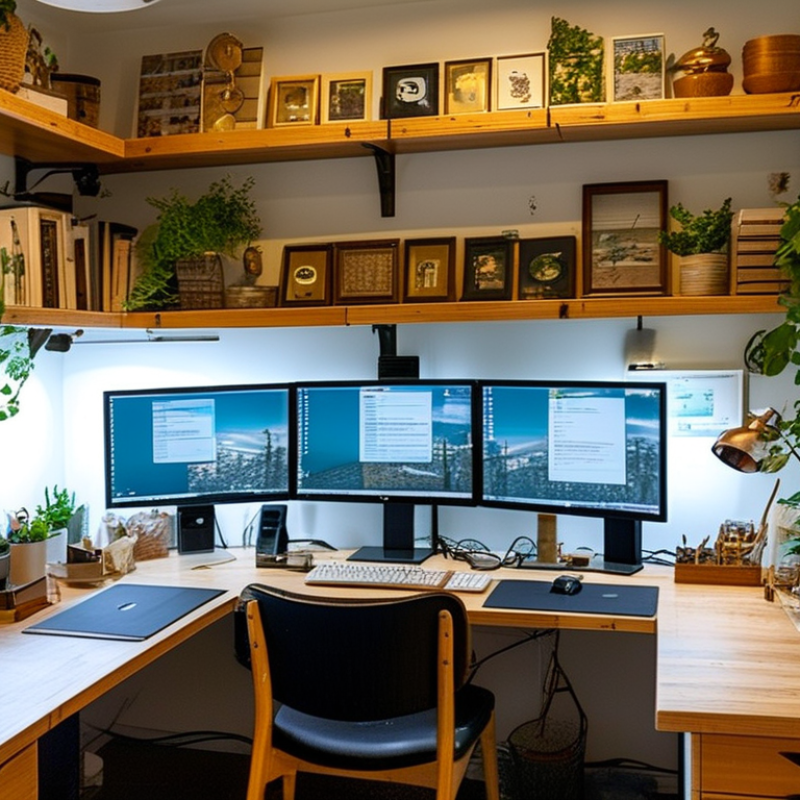
Creating an effective home office begins with selecting the right space. According to a survey by Buffer, 32% of remote workers cite a quiet workspace as essential for productivity. A space with minimal distractions can significantly enhance focus. Natural light plays a crucial role too. Studies show that access to daylight can improve mood and energy levels, increasing overall productivity by 15%.
Privacy is another key factor. An enclosed space helps reduce interruptions from family or pets. Yet, not everyone has access to a separate room. Even a well-partitioned corner can work. As remote work continues to rise, professionals need to think outside the box. Open layouts may seem less intimidating, but they often come with noise challenges and lack of personal space.
Ergonomics cannot be overlooked in home office layouts. Research indicates that 80% of remote workers experience physical discomfort. This discomfort can stem from improper desk setup or furniture choices. An investment in a good chair and a properly positioned monitor can lead to greater comfort and well-being. Thoughtful planning of space not only boosts productivity but also promotes long-term health in the work-from-home environment.
Creating an efficient home office layout is crucial for boosting productivity. One pivotal aspect is selecting the right furniture. A good chair can make a difference. Research suggests that ergonomic chairs can reduce fatigue by 47% and minimize back pain. A comfortable workspace encourages longer focused sessions.
Desks should offer ample surface space. Reports indicate that 70% of workers prefer desks that accommodate dual monitors. This setup can enhance multitasking without overwhelming the user. Good lighting is equally important. Positioning a desk near natural light can improve mood and focus. Studies show that well-lit spaces can elevate productivity levels by 15%.
Storage solutions also merit consideration. Tidiness directly influences mental clarity. Open shelving or filing cabinets can help keep the space organized. However, it is vital to find a balance. Too much storage can lead to clutter. Regularly reassessing furniture and layout ensures ongoing efficiency. What works now might require adjustments later.
Creating a productive home office starts with maximizing natural light. Bright spaces can enhance focus and mood. Position your desk near a window to take full advantage of daylight. Use light, airy curtains to diffuse sunlight beautifully. However, be mindful of glare on your computer screen. This can become distracting and counterproductive.
Ergonomics is equally vital in home office design. A well-fitted chair and desk setup can prevent fatigue and discomfort. Invest time in adjusting your chair height to ensure your feet rest flat on the floor. Keep your monitor at eye level to avoid straining your neck. However, even the best setups can become tedious over time. Regularly assess your layout, looking for improvements or changes that could enhance comfort and efficiency. Small adjustments can lead to significant productivity gains.
Creating a productive home office goes beyond just a comfortable chair and desk. One of the most effective strategies involves integrating technology to create a streamlined work environment. Installing dual monitors can greatly enhance your workflow. This allows you to multitask efficiently and reduces the time spent switching between tabs. However, it's vital to ensure your workspace remains clutter-free.
Ergonomic gadgets, such as standing desks and adjustable keyboard trays, play a key role in maintaining good posture. High-quality headphones can also help drown out distractions, improving focus. But you might face some challenges here. Not all technology is intuitive, and troubleshooting can be frustrating. It's essential to experiment and take time to learn your tools.
Investing in software that monitors productivity can further optimize your work environment. Applications that track time spent on projects can reveal patterns in your workflow. Sometimes, you'll notice that certain tools don't work for you, and that's okay. The goal is to find what enhances your productivity, learning through trial and error. Embracing this process will lead to a more efficient and personalized home office.
Creating a personalized home office can significantly enhance motivation and focus. Start by choosing colors that resonate with you. Soft blues and greens promote calmness, while vibrant yellows can energize your space. Adding art pieces or personal photographs can create a connection to your work. These elements can serve as daily inspiration, fueling your creativity.
Consider your furniture arrangement. Ensure your desk faces a window or an open space. This can reduce feelings of confinement. Also, remember to declutter regularly. A messy desk may lead to a cluttered mind. Incorporate plants for a touch of nature; they are known to boost mood and productivity.
Lighting is another critical factor. A well-lit office can prevent eye strain and keep you alert. Natural light is the best, but soft lamps can work wonders too. Play around with different layouts until you find what feels right. If something isn't working, don’t hesitate to adjust your setup. Reflection and adaptation are key to a productive workspace.
: Look for ergonomic chairs that reduce fatigue and back pain. Comfort is key for longer work sessions.
Desks should have enough surface space to accommodate dual monitors. They support multitasking effectively.
Natural light boosts mood and focus. Position your desk by a window to maximize daylight.
Good lighting is essential. Avoid glare on screens by using light curtains, but ensure ample light is present.
Use open shelving and filing cabinets for storage. Keep your space organized, but avoid clutter from too much storage.
Regularly assess your furniture and layout. What works well now might need adjustments for ongoing efficiency.
When considering what is the best layout for a home office setup, it's essential to start by choosing the right space that promotes focus and productivity. A well-defined area, free from distractions, sets the foundation for an efficient work environment. Essential furniture like a comfortable desk and ergonomic chair can significantly enhance your setup, ensuring that long hours of work do not lead to discomfort or strain.
Maximizing natural light is also crucial, as it not only boosts mood but can improve overall productivity. Incorporating technology seamlessly into your layout helps streamline tasks, while personal touches can motivate and inspire creativity. By thoughtfully designing your home office with these elements in mind, you can create a space that not only looks good but functions effectively, leading to increased productivity and satisfaction in your work.
